




I usually know within the first week whether a language app is going to become part of my routine or remain an interesting experiment. Fluza: AI Language Tutor made a good first impression because it focuses on the part of language study many people avoid: actually producing language and receiving a response. Instead of treating learning as a sequence of passive exercises, it presents itself as an AI coach for learning and practicing languages with immediate feedback.
That positioning matters. I can read vocabulary cards on a bus or complete a grammar lesson during a lunch break, but those activities do not always prepare me to form a sentence when someone asks me something unexpectedly. Fluza is more appealing when I want to move from recognition to use. It belongs in the education category, comes from Vit Corp., and is available free of charge, with optional in-app purchases ranging from $3.49 to $69.99 per item.
My overall reaction is positive, but I would not describe it as a complete replacement for a teacher, a structured course, or real conversation. Its strongest role is as a low-pressure practice partner. Whether it earns permanent space on your phone depends less on the novelty of artificial intelligence and more on whether you can turn its quick feedback into a habit.
Why the first week feels so promising
The first-week appeal comes from reduced hesitation. Speaking or writing in a new language can feel embarrassing even when nobody is listening, because I notice every missing word and awkward sentence. An AI coach changes that emotional setting. I can attempt an answer, make mistakes, and continue without worrying that I am slowing down another person.
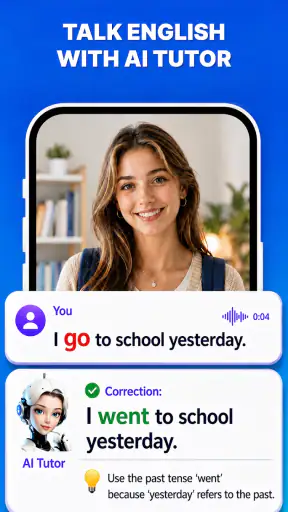
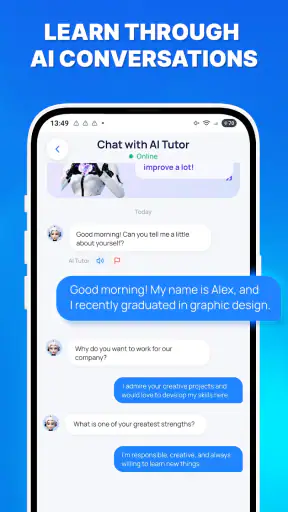
Instant feedback is especially useful for learners who already know more than they can actively use. I often recognize a phrase when I see it but struggle to build a similar sentence myself. Practice with Fluza encourages the reverse direction: start with an idea, try to express it, and then examine the correction. That process exposes gaps that a simple multiple-choice exercise can hide.
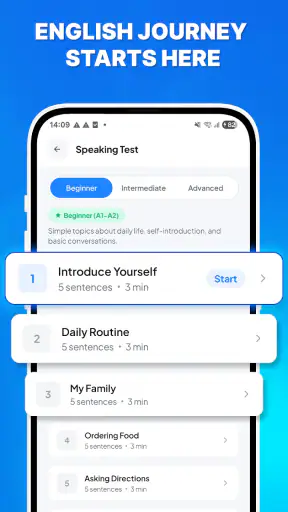
A practical way to test the app is to give it a small daily job rather than expecting it to teach everything immediately. For example, I might use a short session to rehearse ordering food, describing my weekend, asking for directions, or explaining what I do at work. These situations are ordinary enough to repeat and specific enough to reveal whether my vocabulary is usable.
The feedback is most valuable when I slow down and study the reason behind a correction. Tapping through a response and moving on may feel productive, but it turns the app into another stream of disposable exercises. I get more from writing down a corrected phrase, saying it again in a slightly different sentence, and trying to recall it later without looking.
This is one of the less obvious trade-offs of an AI tutor: the app can respond quickly, but the learner still has to decide how seriously to process the response. Fluza can shorten the distance between making a mistake and seeing a possible improvement. It cannot create long-term memory for me if I never revisit the material.
The app is also approachable for people who dislike formal classroom study. Its content rating is Everyone, and the minimum operating requirement is Android 8.0, which makes it accessible to many users with older devices. I would still judge the experience by how comfortable someone is with self-directed learning. A beginner who needs a carefully sequenced explanation of every grammar rule may feel better supported by a traditional course.
Its early appeal is not limited to beginners. Intermediate learners may find it useful precisely because they have enough knowledge to attempt open-ended answers but still need frequent correction. Advanced learners can use it for maintaining fluency in a language they do not speak every day, although they should be careful not to treat every AI response as the final authority on nuance, register, or regional usage.
A realistic everyday routine
Imagine preparing for a short trip while working full time. In the morning, I could practice greetings and basic requests. During a break, I might rehearse a situation that makes me nervous, such as asking whether a dish contains a particular ingredient. In the evening, I could repeat the same idea with different wording instead of starting an unrelated lesson.
That workflow is more useful than chasing a large number of disconnected prompts. The goal is not merely to complete a session; it is to make one situation easier the next time it occurs. Fluza fits this kind of rehearsal because its central promise is immediate interaction and feedback, not simply presenting a static reference library.
I would also keep a personal boundary around the app. If a correction sounds unnatural, I would compare it with a trusted dictionary, textbook, or native speaker before memorizing it. AI-generated guidance can be convenient while still needing human judgement, particularly for politeness, humor, idioms, and regional differences.
What remains useful after the novelty fades
The month-to-month question is harder than the first-week question. Almost any interactive learning tool can feel exciting at the beginning. Lasting value appears when I can return to the same app for different purposes: building confidence, refreshing forgotten phrases, preparing for a real event, and keeping a language active between larger study sessions.
Fluza has a reasonable chance of becoming that kind of maintenance tool because feedback is useful at several stages of learning. A beginner can use it to attempt simple sentences. An intermediate learner can test more natural phrasing. Someone who once studied a language can use short practice sessions to recover vocabulary that has become passive.
The important distinction is between practice that exposes a weakness and practice that only confirms what I already know. If I always choose comfortable topics, the app may feel smooth while my actual ability remains narrow. I would deliberately alternate familiar subjects with difficult ones: personal opinions, past events, explanations, and follow-up questions. That creates more productive friction.
A second useful habit is to treat feedback as material for later retrieval. After a session, I would choose only a few corrections worth keeping. Trying to remember everything is unrealistic and can make the routine exhausting. A small selection of phrases connected to my own life is more likely to return when I need it.
For example, a learner moving to a new city might collect language for appointments, transport, shopping, and workplace introductions. A parent could practice school-related conversations. A traveler might focus on requests and clarifications rather than memorizing broad vocabulary. The app becomes more valuable when the practice reflects an upcoming need instead of an abstract idea of fluency.
There is also a useful role between formal lessons. A textbook can explain a concept carefully, while a tutor or conversation partner can offer context and natural interaction. Fluza can occupy the gap between those sessions, giving me a place to try sentences before using them with another person. That makes it complementary rather than competitive with every other learning method.
Still, I would not rely on it alone for pronunciation confidence, cultural understanding, or spontaneous conversation with real people. Immediate AI feedback may help me notice language problems, but real conversations include interruptions, accents, incomplete sentences, background noise, and unexpected changes of subject. Those pressures require practice outside the app as well.
The app’s public reception suggests that many users find the concept worthwhile: it holds a 4.8 average from around 3.1 thousand ratings and has passed 1 million installs. Those figures do not decide whether it suits me, but they do make it easier to view Fluza as an established learning option rather than a curiosity with no audience. Its current version is 1.4.0, so I would expect the experience to continue changing and would keep an eye on updates before building my entire study system around it.
Who gets the most lasting value?
I think Fluza is best for learners who need frequent, low-pressure output practice. It suits someone who knows basic vocabulary but freezes when forming sentences, a traveler preparing for common interactions, or a busy adult who can spare short periods but cannot attend regular classes. It is also a sensible companion for people who already use a course and want more opportunities to produce language.
I would be more cautious recommending it to someone who wants a strict curriculum from absolute beginner level through advanced study. The appeal of an AI coach is flexibility, but flexibility can become a weakness when I need a clear order of lessons, explicit progress milestones, and a teacher who notices patterns over time.
It may also be a poor fit for a learner who dislikes speaking or writing into an app. The central benefit depends on active participation. If I only read prompts, skip corrections, or choose the easiest possible responses, I am paying for the appearance of practice rather than using the feature that makes the product distinctive.
The maintenance burden is manageable, but not invisible
Every language app competes with the same practical problems: limited time, inconsistent energy, and the temptation to mistake a completed activity for real progress. Fluza reduces some friction by offering an accessible coach, but it does not remove the need to schedule practice. I would rather use it briefly and regularly than wait for a large block of free time that rarely appears.
A simple maintenance plan would have three layers. First, use short sessions to keep the language active. Second, reserve a longer session occasionally for a topic that requires explanation or more complex expression. Third, connect app practice to something outside the app, such as writing a message, speaking with a partner, or listening to authentic content.
This prevents Fluza from becoming a closed loop. If every correction is consumed inside the same interface, I may become good at responding to the app without becoming equally comfortable elsewhere. The transfer step is essential: take a corrected phrase and use it in a real message, say it aloud while walking, or include it in a conversation.
The free price lowers the barrier to trying that routine, though optional purchases can change the cost of extended use. I would begin with the free experience and decide based on actual repetition, not on the excitement of the first session. If I am not returning consistently, paying for more access will not solve the underlying habit problem.
That is also where the listed purchase range deserves practical attention. The difference between a small optional purchase and the highest item is substantial, so I would check exactly what each purchase unlocks before committing. A learner who only wants occasional rehearsal may need something very different from someone planning daily, long-term use.
Device compatibility is another small advantage for people who do not own a new phone. Since it supports Android 8.0 and later, Fluza is not restricted to the newest hardware on that platform. I would still expect the quality of my sessions to depend on a quiet setting, a reliable connection, and enough willingness to concentrate; an older compatible phone can run an app, but it cannot make distracted practice effective.
Where fatigue begins
The first source of fatigue is repetition without a personal goal. If I keep asking for generic practice, the interaction can lose meaning. I would refresh the routine by changing the situation, increasing the difficulty gradually, and returning to errors that matter in my daily life rather than collecting corrections for their own sake.
The second is feedback overload. Seeing several improvements at once can be helpful, but it can also make every sentence feel wrong. I learn better when I separate serious communication problems from minor stylistic refinements. Not every alternative phrasing deserves equal attention, and perfectionism can make an otherwise useful tool unpleasant.
The third is uncertainty about nuance. An AI coach can be fast and patient, but speed is not the same as cultural authority. I would use Fluza confidently for rehearsal and pattern discovery, then verify important expressions through trusted human or reference sources. This is particularly important before using a phrase in a professional, sensitive, or formal setting.
Another limitation is motivation. The app can make practice easier to start, but it cannot supply a meaningful reason to continue. My strongest routines would be tied to a concrete event or identity: preparing for travel, speaking with relatives, handling work tasks, or keeping a language alive after moving away from its community.
People who want social accountability may also need another tool or arrangement. An AI coach does not automatically provide the emotional commitment of a classmate, teacher, or conversation group. If my main problem is giving up alone, I would pair Fluza with scheduled human contact instead of expecting the app to solve motivation by itself.
My long-term verdict
After the initial novelty, I see Fluza as a useful language-maintenance and output-practice app rather than a complete language education system. Its best quality is the invitation to attempt language now, receive feedback quickly, and try again without embarrassment. That is a meaningful advantage over passive study, especially for learners who understand more than they can comfortably say.
I would recommend it to a friend who wants an approachable AI practice partner and is willing to take responsibility for the learning process. I would suggest using it around real situations, saving only the most useful corrections, and checking important nuances elsewhere. That approach gives the app a clear job and prevents it from becoming another notification that feels productive without changing behavior.
I would skip it, or at least avoid making it my only resource, if I needed a complete curriculum, detailed human instruction, formal assessment, or sustained conversation with real people. A textbook, class, specialist teacher, or language exchange may be better for those needs. Fluza is strongest in the space between structured study and real-world use.
Its free entry point, Everyone rating, broad Android compatibility, and strong user response make it easy to try. The developer is Vit Corp., and the app is currently at version 1.4.0, so I would approach it as a developing tool rather than a fixed course. The optional purchases also mean that long-term users should evaluate their actual routine before spending more.
My final judgement is that Fluza can earn lasting space on a phone, but only when I use it as a bridge to active language use. The app supplies a convenient coach and immediate reactions; I supply the goals, repetition, judgement, and real conversations. If that division of responsibility suits you, it is a worthwhile education app to keep returning to after the first-week excitement has disappeared.


